From this Threads post, I learned today that Apple Reminders can be used as Kanban board.
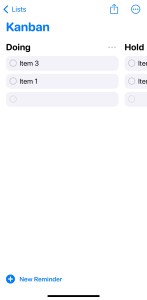
Make sure you set Reminders to “View as Columns”. Add new section to add new column in that Kanban board.
From this Threads post, I learned today that Apple Reminders can be used as Kanban board.
Make sure you set Reminders to “View as Columns”. Add new section to add new column in that Kanban board.
 naveegator.in
You must be logged in to post a comment.